

Optum Assistant:
Designing AI for Healthcare at Scale
Industry
Healthcare
Role
Senior Product Designer
Team
UX Leadership, Product, Design, Engineering
Timeline
6 months
Platforms
iOS & Android
SCOPE
0→1 Generative AI
The Challenge
Healthcare is complex.
Getting help shouldn't be.
01
The care journey was fragmented
Critical tools, records, claims, and scheduling spanned disconnected products and underlying systems, creating breaks in the experience as members moved between routine healthcare tasks.
02
Simple needs became support calls
Call-center data, behavioral analytics, and member research revealed where self-service broke down—turning routine questions and tasks into unnecessary support interactions.
03
Complexity got in the way of action
Healthcare terminology and complex interactions made routine tasks harder to understand, reinforcing the need for clear language, contextual guidance, and obvious next steps.
WHAT WE HAD TO LEARN
Before designing an assistant,
we had to understand when people would trust one.
01
Where self-service broke down
Partnering with the design lead, I synthesized existing research and the competitive landscape to understand where members hit dead ends—and how emerging assistants were approaching those moments.
02
What made AI feel trustworthy
Research explored expectations around AI, disclosure, confidence, and when members wanted a human instead.
03
Whether the interaction actually worked
Prototype testing helped refine intent recognition, language, UI states, and fallback behavior before scaling the experience.
WHAT RESEARCH TOLD US
From Companion
to Assistant.
01
Research finding
Human-like “companion” framing risked creating expectations the product couldn't reliably fulfill.
02
Product judgment
Don't encourage expectations of friendship or human equivalence.
03
Design decision
Frame the experience around assistance, with clearer boundaries around its role and capabilities.
THE APPROACH
Not a destination.
An intelligence layer at moments of need.

Working directly with UX leadership, I explored and refined competing directions for Assistant, establishing the core interaction model that informed the experience moving forward.

Meet members in the journey
Place assistance inside high-friction moments rather than requiring members to find and navigate a separate AI experience.
Turn conversation into action
Design beyond question-and-answer so the assistant could help members move through tasks—from understanding options to completing next steps.
Design trust into the system
Make uncertainty, fallbacks, and human handoffs part of the interaction model so the assistant could remain useful without pretending to know more than it did.
DESIGN MODEL
Help, where it matters.
Across the care journey.
We identified high-friction moments where people needed help most and designed the assistant to show up with the right support, at the right time.
Outcomes
91%
Intent recognition
86%
Return Rate
+10 pts
NPS Increase
An assistant that moves with the member.
Member data and context shape what the assistant surfaces – and when. Not a destination, but an intelligence layer across the experience.
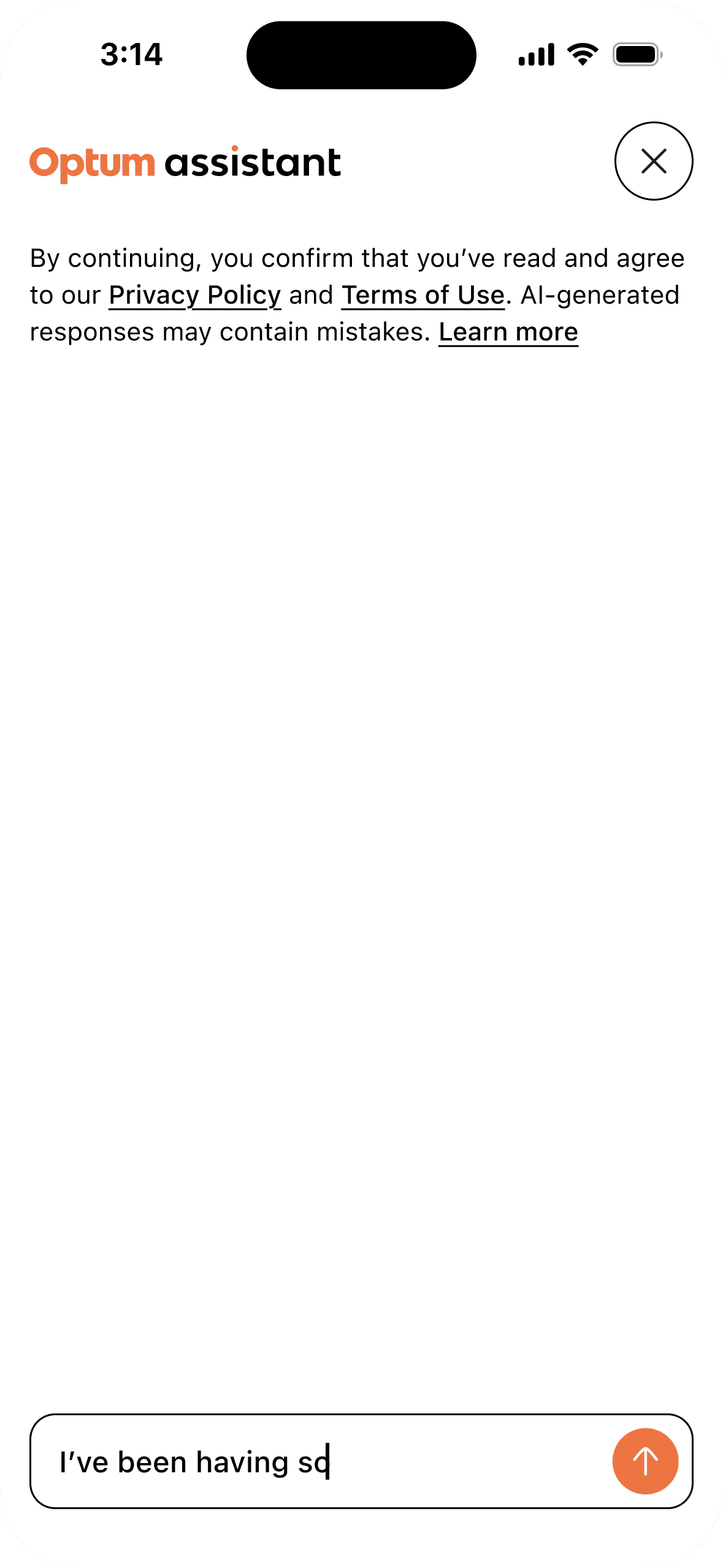
Tailoring the Entry Point to Prevent Cognitive Overload
An intent-based entry point dynamically tailors the greeting to a user's live account status. As soon as a user starts typing, the interface deploys progressive disclosure to shift visual focus, eliminating distractions and keeping the user entirely centered on their query.

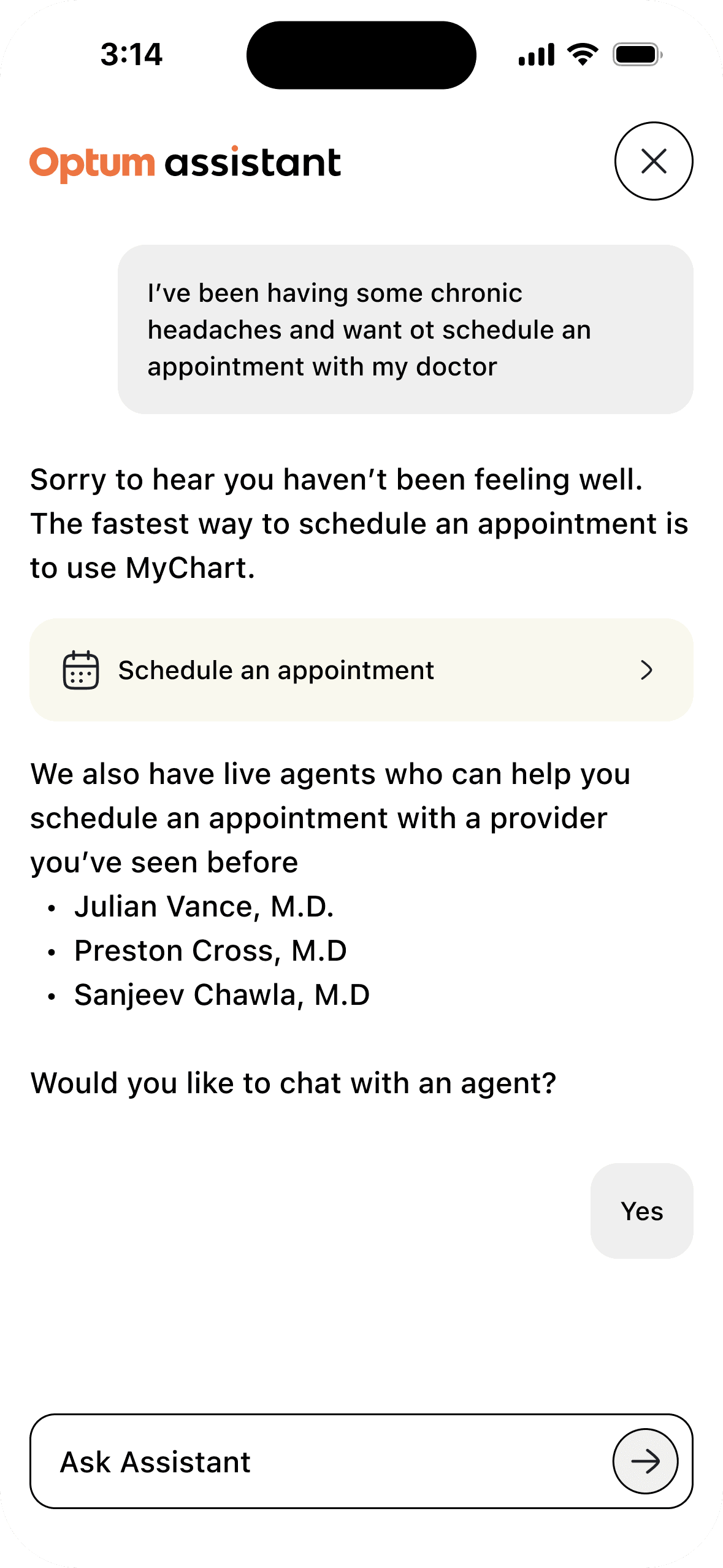
Streamlining Care Scheduling
Designed a mixed-mode conversational flow connecting open-ended chat to adaptive UI shortcuts. By instantly extracting intent and account history, the system eliminates search friction for an immediate self-service path or a seamless agent handoff.


Rigid Forms to Contextual Feeds
Embedded multi-select filters and location pickers directly into the chat stream to capture complex patient data without drop-off. By naturally gathering clinic and provider preferences in-line, the system builds an agent-ready payload without forcing users through a clunky form.


Agent Handoff & Session Continuity
When a user explicitly chooses to switch to a live agent, the interface passes them over while retaining their chat thread history. To mitigate frustration and drop off during the transfer, the UI displays clear, real-time wait times the moment they choose to connect. Additionally, if a user tries to close the window during an active chat, a quick warning pop-up prevents them from losing their live chat session unintentionally.


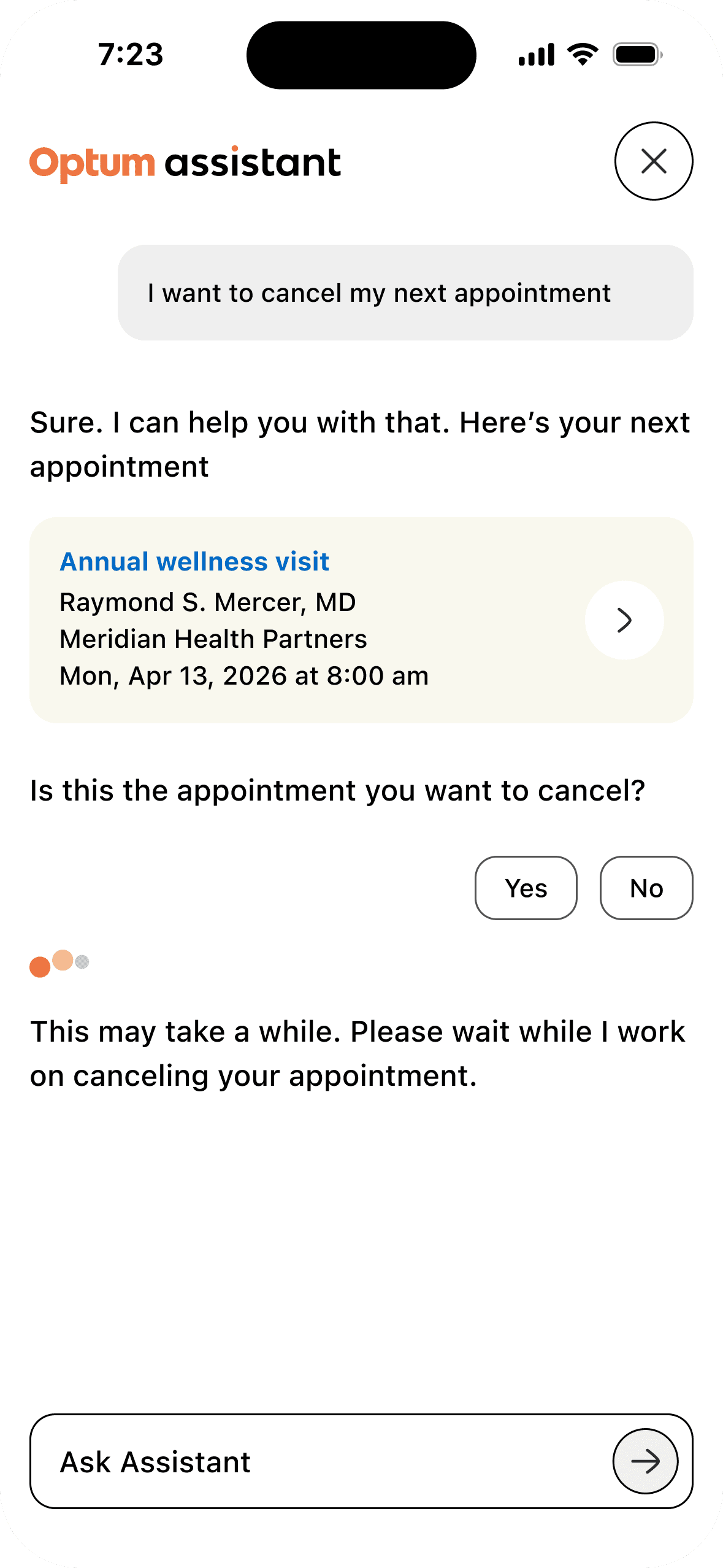
Bypassing Complex Portal Workflows
Users frequently turn to a chat assistant when they are frustrated by confusing, multi-page portals. By surfacing live booking details directly inside the feed, the assistant cuts through deep navigation paths to process cancellations in real time—eliminating the friction of a context switch.
Translating Clinical Data into Actionable Insights
Medical jargon and lab results can be difficult for patients to interpret without context. The assistant simplifies complex health data by delivering plain-language breakdowns within the message stream. When an inquiry requires deeper record navigation, the interface surfaces structured shortcuts to specific platform areas like test histories and care pathways—bridging open-ended questions with definitive patient data.


Intercepting Sensitive Data In-Flight
To maintain strict data privacy and regulatory compliance, the interface actively intercepts and masks restricted inputs—like Social Security or credit card numbers—directly inside the message bubbles. It pairs real-time privacy guidance with secure deep-links to billing profiles, protecting sensitive PII without breaking user momentum.


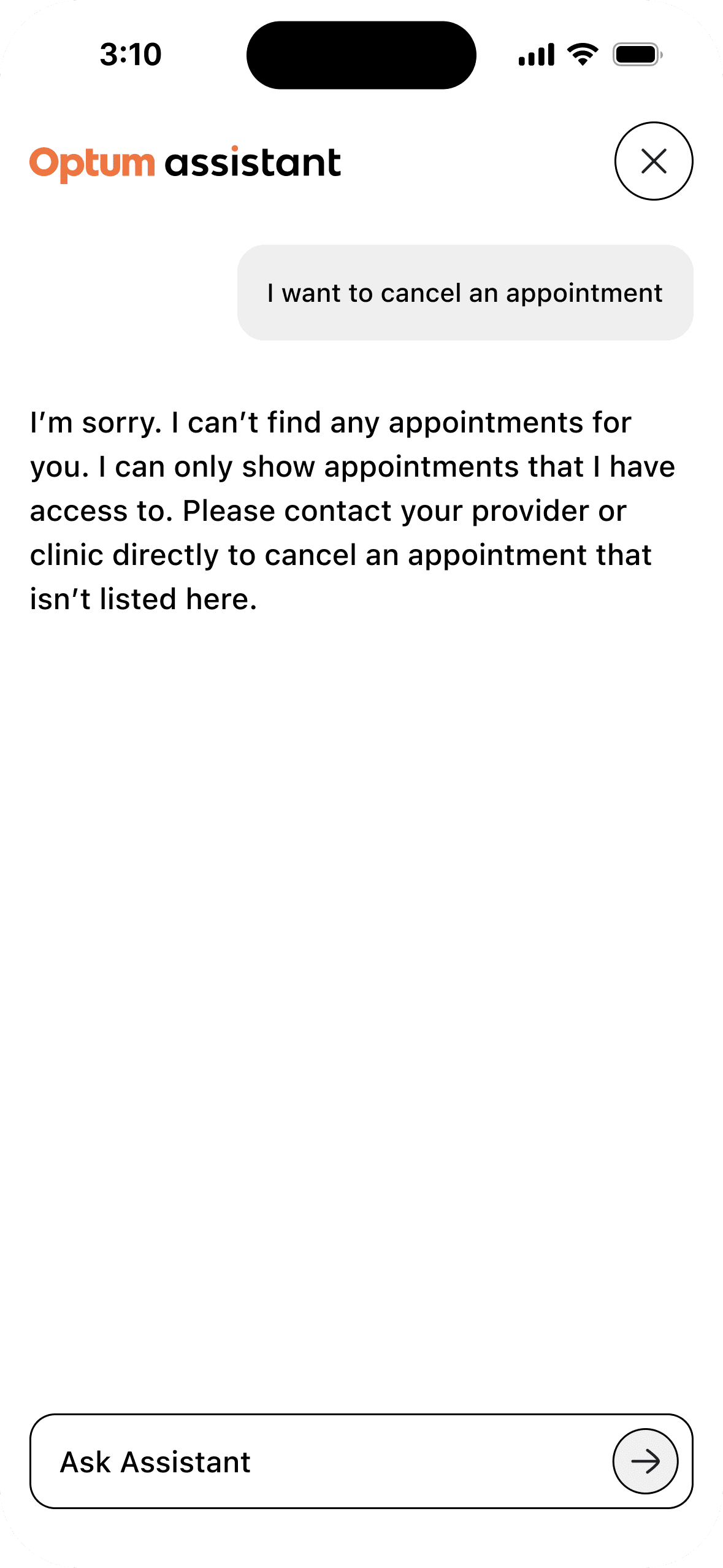
Structuring Automated Fallbacks and Safety Nets
When APIs trigger a no-match state for active bookings, a structured fallback path takes over. Conversely, for high-risk routing scenarios like a medical emergency, intent-classification guardrails instantly override standard automation to surface deterministic safety instructions and offline care numbers.

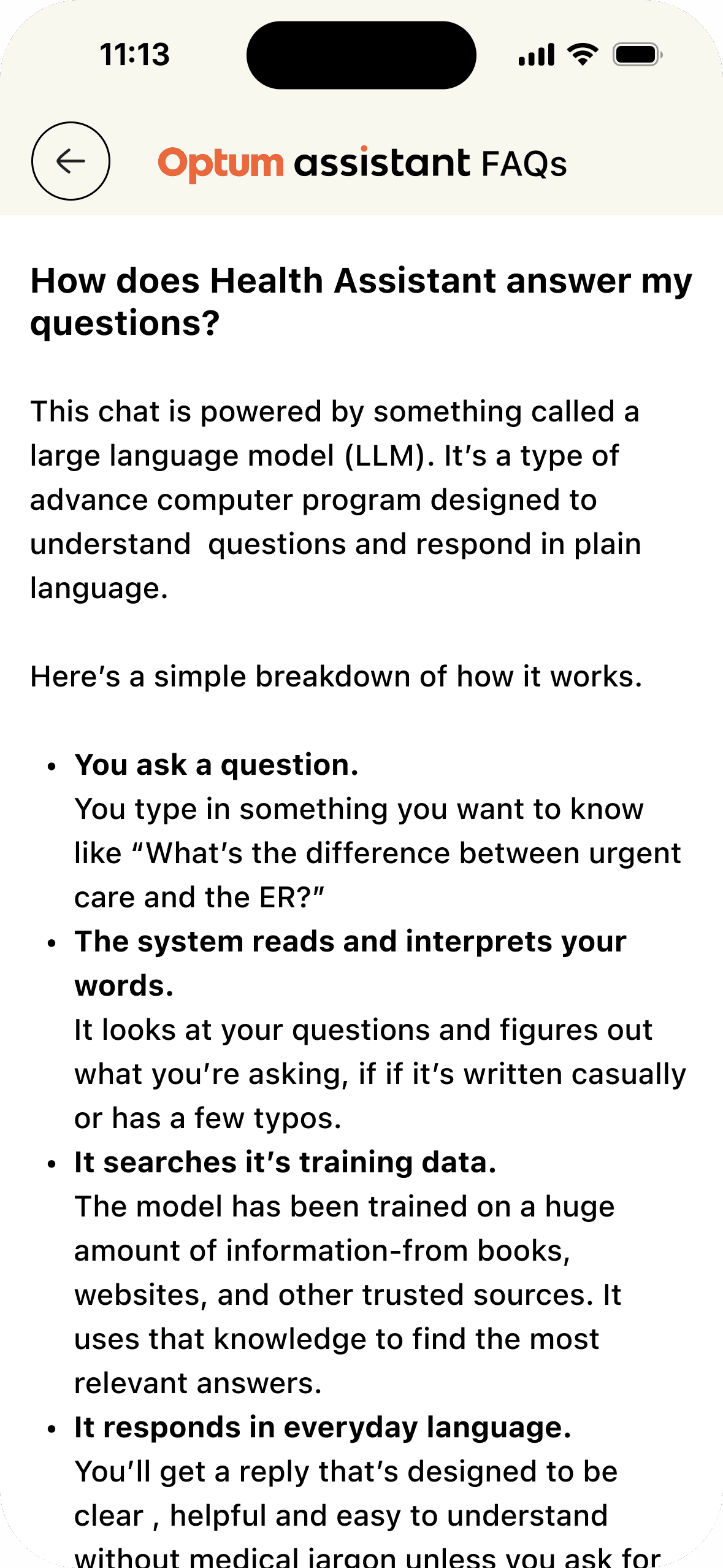
Demystifying AI Mechanics to Build User Trust
Integrating AI into high-stakes healthcare environments requires proactive system transparency. A dedicated, plain-language FAQ module explains the system's core capabilities upfront—setting clear expectations, reducing user hesitation, and driving adoption.

91%
— Intent Recognition
Elevating accuracy by aligning natural language queries with definitive portal shortcuts.
7.5K+
— Monthly Active Users
Driving self-service adoption through accessible conversational frameworks.
86%
— User Return Rate
Building long-term platform trust and retention through proactive privacy and transparency workflows.
+10 Points
— NPS Increase
Minimizing friction by overhauling care access models and optimizing fallback guardrails.
12%
— Task Completion Velocity
Accelerating successful web and mobile transactions by bypassing legacy, deep-nested portal navigation.
Future Impact & Tracking
Next Phase: Partnering with analytics teams to track live agent volume reduction for routine appointment cancellations, measuring the exact dollar value of automated containment.
Want to know more?
Let's hop on a call to chat about how strategic UX empowers us and helps train smarter systems.